// one payment · your network · forever

Play classic LAN games online & connect remote machines — forever.

The one-time-purchase virtual LAN and service-exposure tool. Simulated broadcast packets for vintage multiplayer hits, or nothing more than the ports you expose when your game or service connects by IP. No subscriptions. No account. Total privacy.

🪟 Windows 🐧 Linux 🍎 macOS
Community

💶 One-time purchase — from €20 · yours forever · no subscriptions

internet-lan-gun — cli

get your files

Three steps. That's the whole process.

No signup, no password to forget, no dashboard to log into. You get a zip file and its extraction password — that's the product.

  1. 1

    Configure & order

    Pick 2–32 nodes, name them (or roll the dice), add your email. You instantly get an order ID — your payment reference and the only credential you'll ever need.

  2. 2

    Pay once — €10 / node

    Complete the one-time payment quoting your order ID. No card stored, no recurring charge, no account tied to it.

  3. 3

    Zip + password. Done.

    Once your order is matched, your package appears on My orders. Download it with your email + order ID, and see the archive password right before the download starts.

capabilities

Core features & use cases

Classic gamers — virtual LAN

  • A fast, secure private network between your own machines over the internet — that's the core.
  • Included OpenVPN configuration (GUI support on Windows) provides the broadcast support vintage titles need — Warcraft III: Frozen Throne, StarCraft: Brood War, Diablo II, Counter-Strike 1.6, Red Alert 2 / Yuri's Revenge, Age of Empires II.
  • Native on Windows, Linux and macOS.
  • Your old LAN crew, back in a lobby — like the days were.
Developers — service exposure

  • Expose TCP/UDP services, apps and databases to other machines over the internet, securely.
  • Flexible port binding: expose a port on client1, bind it on the server or any clientX.
  • No OpenVPN on this path — if it connects by IP, expose the port locally and aim at the virtual IP.
  • One gateway port forwarded (51820); scales to 32 nodes.

Peace of mind

  • Set and forget: encrypted configuration saved on every change; runs persistently unless your server IP changes or firewalls interfere.
  • One-time pay: own your network layout forever, zero monthly overhead.
  • No account: your order ID is the only secret. Nothing to log into, nothing to breach centrally.

how it works

Two paths. Pick yours.

Same fast, secure mesh underneath — you only choose how your traffic crosses it: plain exposed ports, or the OpenVPN layer for games that still speak LAN broadcast.

Service exposure & port binding

No OpenVPN involved

  1. 1

    Start the app

    Launch internet-lan-gun on your machines — it enables local port exposure and binding.

  2. 2

    Expose & bind ports

    Expose a port on client1, bind it on the server or any clientX. TCP/UDP services, apps and databases cross machines — no cloud routing.

If it connects by IP, this is all it takes — the game or tool aims at the node's virtual IP (shown by status).

Classic LAN games (broadcast support)

OpenVPN used here

  1. 1

    Start the app

    Launch internet-lan-gun to bring up your network bridge.

  2. 2

    Connect the OpenVPN profile

    🪟 Windows (OpenVPN GUI): import the internet-lan-gun.ovpn profile — drag it onto the tray icon (or tray menu → Import) — then right-click → Connect.

    🐧 Linux / 🍎 macOS: sudo openvpn --config internet-lan-gun.conf

Broadcast titles — Warcraft III, StarCraft, Diablo II, CS 1.6, Red Alert 2, AoE II — discover each other via broadcast packets. The OpenVPN profile supplies them; Internet LAN Gun keeps the transfer fast and secure. A game with a connect command? That's path A — skip OpenVPN entirely.

💻 Linux & macOS console mode: when there's no graphical output, start both server and client with --cli; the client takes --host ip[:port] (default port 51820).

real output

Console mode — the mesh live

On Linux and macOS the engine also runs headless. Real startup and status output from a 32-node network — one gateway host, every other machine a virtual peer.

■ Gateway Host Cleveland_Brown
$ ./internet_lan_gun_Cleveland_Brown --cli [Dynamic-Host] Successfully exposed virtual gateway: 10.0.0.1:1194 tcp Port exposed successfully at runtime! udp Port exposed successfully at runtime! … 31 peer routes installed via NIC 1 … ════ Internet Lan Gun Core Running | ListeningPort: 51820 ════ internet-lan-gun> status Local Node Name : Cleveland_Brown Core State : ONLINE (Active) Topo Network Mode : Gateway Host Node Active Virtual Peers: 31 PEER NAME | VIRTUAL IP | ENDPOINT | RX | TX | UP ────────────────────────────────────────────────────────────── Cupid | 10.0.0.27/32 | 192.168.7.204:51821 | 424 B | 184 B | 28s Green_Goblin | 10.0.0.8/32 | — | 0 B | 0 B | — Psycho_Mantis | 10.0.0.22/32 | — | 0 B | 0 B | — … + 28 more peers COMMANDS: status · peers · bind-port · expose-port · help
■ Virtual Peer Cupid
$ ./internet_lan_gun_Cupid --cli --host 192.168.7.204 --listening_port 51821 [Engine] Manually triggering handshake for peer: A1wCdi … [Dynamic-Tunnel] Ingress adapter opened: 127.0.0.1:1194 tcp + udp ports bound successfully at runtime! … 31 peer routes installed via NIC 1 … ════ Internet Lan Gun Core Running | ListeningPort: 51821 ════ [Handshake] SECURE KEY EXCHANGE COMPLETED Peer: A1wCdiqmcg … internet-lan-gun> status Local Node Name : Cupid Core State : ONLINE (Active) Topo Network Mode : Virtual Peer Client Active Virtual Peers: 1 PEER NAME | VIRTUAL IP | ENDPOINT | RX | TX | UP ───────────────────────────────────────────────────────────── Cleveland_Brown | 10.0.0.1/32 | 192.168.7.204:51820 | 92 B | 180 B | 10s RESULT: 127.0.0.1:1194 → tunnelled to the gateway — any local tool can connect

💡 Games with a connect command skip OpenVPN entirely: expose the port, aim the game at the node's virtual IP (shown by status). Broadcast-discovery titles get the included OpenVPN profile for the packets they need.

proxy mode

VPN proxy through peers

Any peer in your network can relay your traffic. Pick the peer, let it allow VPN traffic through its machine, and point your apps at a local SOCKS5 proxy — no extra software, no cloud hop. Your machines only.

1

Select a peer

Open Internet LAN Gun and choose the peer name whose connection you want to route through — e.g. Cleveland_Brown.

2

Allow VPN traffic on the peer

On that peer machine, tick "Internet LAN Gun allowed VPN traffic through your machine" and confirm the prompt.

3

Use the local proxy

Set 127.0.0.1:10808 as the SOCKS5 proxy in your browser, app or shell. Traffic now leaves through the peer.

■ Verify on Linux socks5 · 127.0.0.1:10808
# Outgoing IP must now be the peer's public IP: $ curl --socks5 127.0.0.1:10808 https://ifconfig.me 203.0.113.77 # UDP ASSOCIATE check — DNS-over-SOCKS5 relayed via the peer: $ echo -ne '\x04\x08\x08\x08\x08\x00\x35\x12\x34\x01\x00\x00\x01\x00\x00\x00\x00\x00\x00\x06google\x03com\x00\x00\x01\x00\x01' \ | socat -t 2 - UDP-DATAGRAM:127.0.0.1:10808 | xxd 00000000: 0000 0000 8180 0001 0000 0000 0001 0667 ...............g 00000010: 6f6f 676c 6503 636f 6d00 0001 0001 oogle.com....

💡 Works with any SOCKS5-capable app: browser proxy settings, curl --socks5, ALL_PROXY=socks5://127.0.0.1:10808. UDP is relayed too, so DNS lookups also leave through the peer.

the differentiators

Why a LAN gun?

True LAN broadcast

Most virtual networks are tunnels, not a LAN. This one ships with OpenVPN broadcast support — so Diablo II and Warcraft III still find each other the way they were built to, while the transfer underneath stays fast and secure.

One-time, yours forever

€10 per node. A single payment — no monthly bill, no renewal, no feature paywalls. Your node names and layout stay yours, delivered as one zip and its password.

One-time purchase from €20 2–32 nodes no subscription

who it's for

Built for lobbies that refuse to die

Diablo II Warcraft III StarCraft Age of Empires II Counter-Strike 1.6 Red Alert 2 remote SQL SSH game-dev playtests
“Set up my whole old LAN crew in an afternoon. It's like the internet remembers the local area.”
Jonas · classic FPS
“Broadcast support is the killer feature. Games just… find each other. No config wizardry.”
Mira · strategy
“Clean way to expose a service between two machines without opening a port to the world.”
Kai · developer

see it in action

The interface

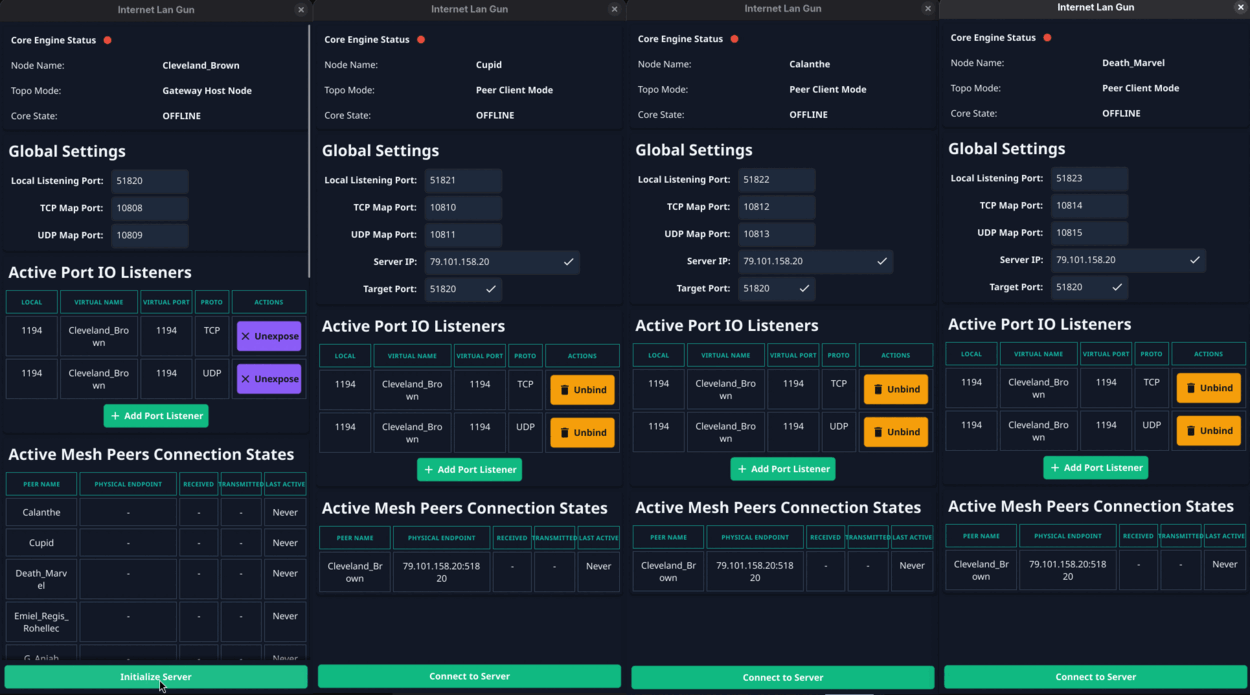
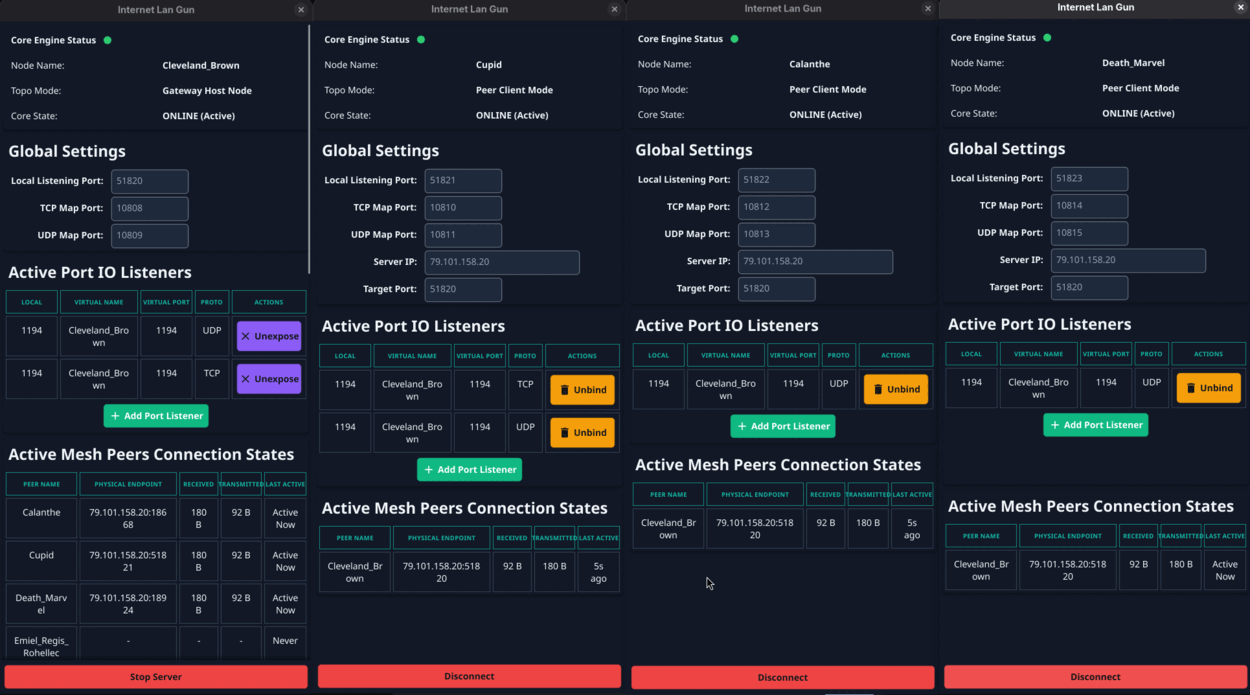
Server and client instances below are standalone examples, not a connected network.

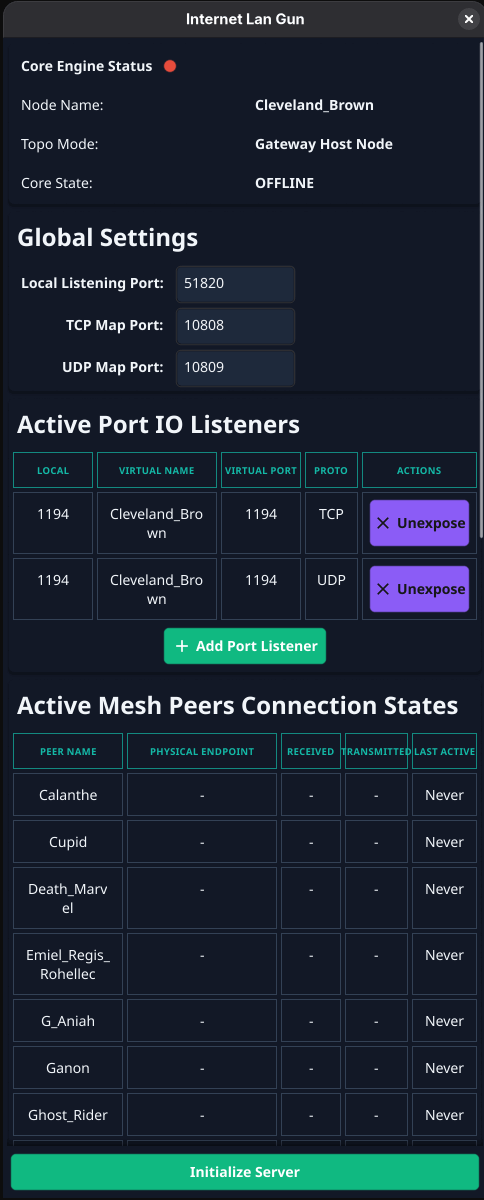
Server instance

The central gateway interface, ready to handle up to 31 client connections securely.

Internet LAN Gun Server Interface

Client instance

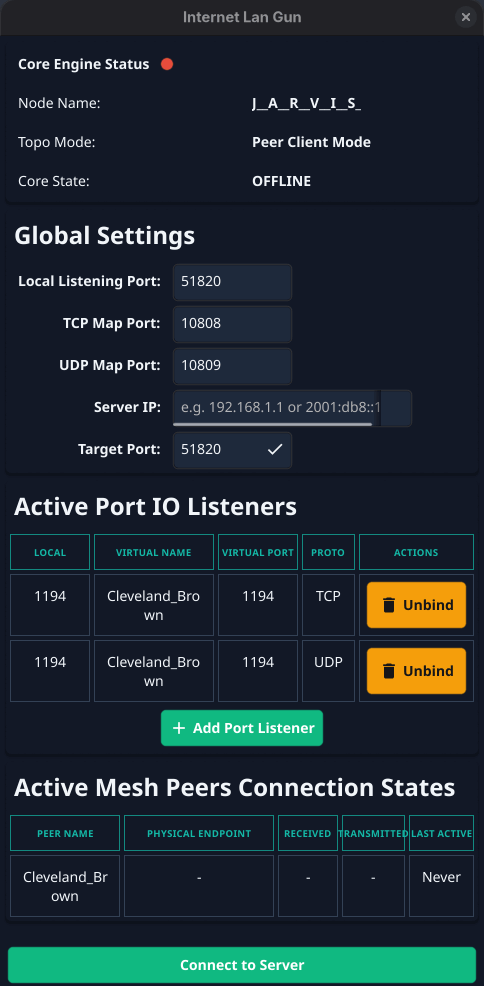
Individual client node. Type the server's IP to join the network through the exposed port.

Internet LAN Gun Client Interface

Multiple instances — not connected

Nodes before the connection is established.

Multiple Instances Not Connected

Multiple instances — connected

All nodes connected and communicating securely.

Multiple Instances Connected

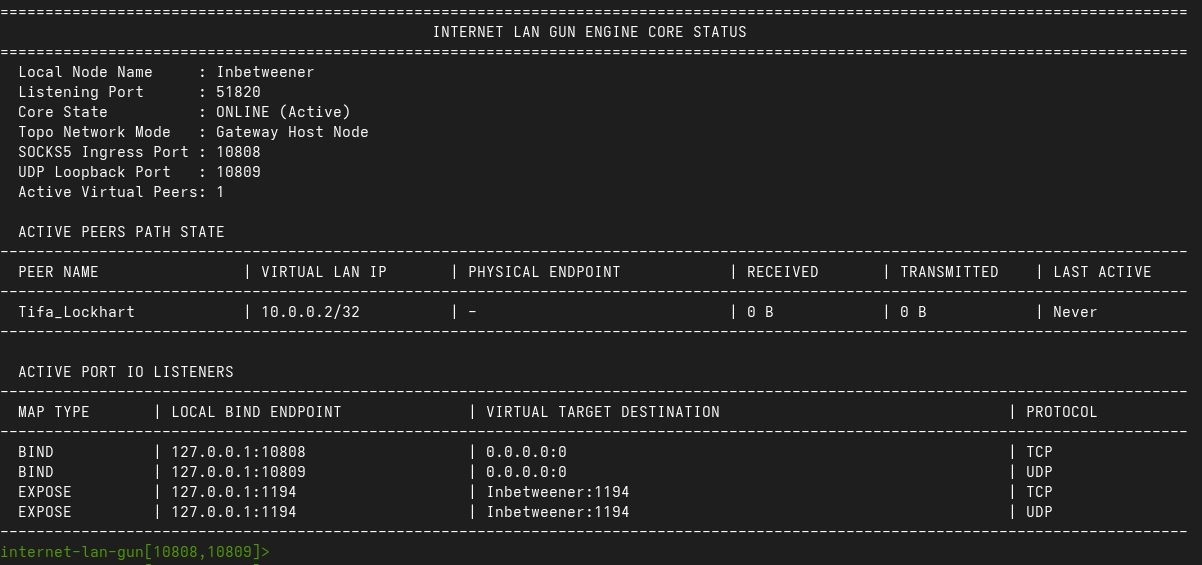
Console / CLI version

Headless mode for Linux and macOS, started with --cli.

Internet LAN Gun Console Interface

faq

Frequently asked

Do I need to create an account?

No — never. You give us an email, we hand you an order ID, and that pair is all that exists. Downloads require exactly those two things, and the package itself is a zip file plus its extraction password. No login, no dashboard, no password of your own to manage.

How do I receive my files?

After your order is received and payment matched, our delivery service builds your network package and drops it next to your order. It then appears on My orders — you enter your email + full order ID, we show you the archive password with a copy button, and the zip starts downloading.

How is it different from a normal VPN?

A normal VPN is a big tunnel: all of your traffic detours through a gateway. Internet LAN Gun is targeted — a fast, secure network between your own machines over the internet, exposing exactly the ports you need. Games (and services) with a 'connect' command need just that. Broadcast-discovery games are the exception: your package includes an OpenVPN configuration that provides the broadcast packets they rely on.

Do I have to port-forward?

You configure the server once; clients connect to it. You don't manage raw port rules for every app — Internet LAN Gun handles the exposure and binding.

Is it really one-time pricing?

Yes — €10 per node, a single payment. No monthly fee, no renewal, no subscription. Your node names and layout stay yours.

What platforms are supported?

Windows, Linux and macOS — natively. Linux and macOS also have a console mode (--cli) for headless machines: ./internet_lan_gun_Cupid --cli --host 192.168.7.204 --listening_port 51821. Inside the console: status, peers, live port binding.

Can I add more clients to my network later?

No — the count is final once your network is built. Your security data never passes through us and we keep no central copy (that's the point), so there is no mechanism on our side to admit new peers after delivery. Expecting the team to grow? Order the extra nodes up front — €10 each, one-time.

configure · order

Build your network

Pick your node count, name your machines, leave an email. You get an order ID back instantly — no account created, ever.

21632
Selected: 2 nodes
Total
€20
€10 per node · min 2 (€20) · max 32 (€320) · one-time

Node names

Place your order

Used to find your order and match payment. No marketing, no account.

🔒 One-time payment · no card stored · zip + password delivery

  1. Order → instant order ID
  2. Pay once, quoting it
  3. Download zip + password